
YOLO Model Fine-Tuning
By Amith Kashyap & Ananth BK • December 29, 2025
YOLO (You Only Look Once) is a real-time object detection system that predicts bounding boxes and class probabilities in a single forward pass, framing detection as a regression problem. Introduced by Joseph Redmon in 2016, YOLO has evolved through multiple versions (YOLOv1–v8) and variants like YOLO-NAS and PP-YOLO.
Introduction to YOLO
Why YOLO Matters
Unlike traditional methods (R-CNN, Fast R-CNN, Faster R-CNN), YOLO is fast, efficient, and end-to-end, enabling real-time detection on edge devices. Applications include autonomous driving, surveillance, industrial inspection, medical imaging, AR, and retail analytics.
How YOLO Works (High-Level)
- Grid Division: Image divided into S × S grid.
- Bounding Box Prediction: Each grid predicts boxes with confidence scores.
- Class Prediction: Each grid predicts class probabilities.
- Final Output: High-confidence boxes are selected; duplicates removed via non-maximum suppression.
Use Cases of YOLO
YOLO Applications Across Domains
- Industrial Automation: Detects defects, count products, monitor machines — real-time, accurate in cluttered scenes.
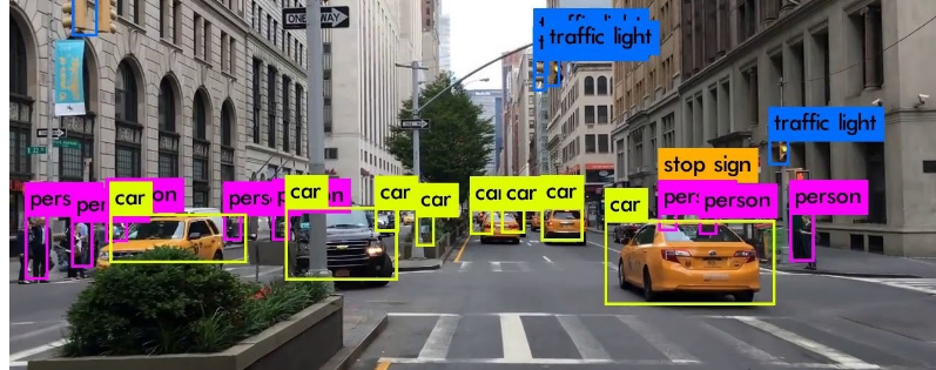
- Autonomous Vehicles: Pedestrian/vehicle detection, traffic lights, lanes — low-latency, edge-device friendly.
- Traffic Monitoring: Vehicle counting/classification, incident detection — works with low-res footage, easy integration.
- Healthcare/Medical: Tumor/anomaly detection, cell counting — adaptable to medical datasets, fast processing.
- Security & Surveillance: Intruder/weapon detection, mask compliance — high FPS, suitable for edge deployment.
- Retail & Customer Analytics: People counting, shelf monitoring, shopper behavior — boosts efficiency, improves insights.
- Agriculture: Crop/pest detection, livestock monitoring — works with drone imagery, trainable on domain-specific data.
- Robotics: Object tracking, navigation assistance — real-time perception, hardware-embeddable.
- Augmented Reality (AR): Object labeling, gesture detection — interactive, low-latency UX.
- Environmental Monitoring: Wildlife, litter, pollution detection — works outdoors, supports drone/static feeds.
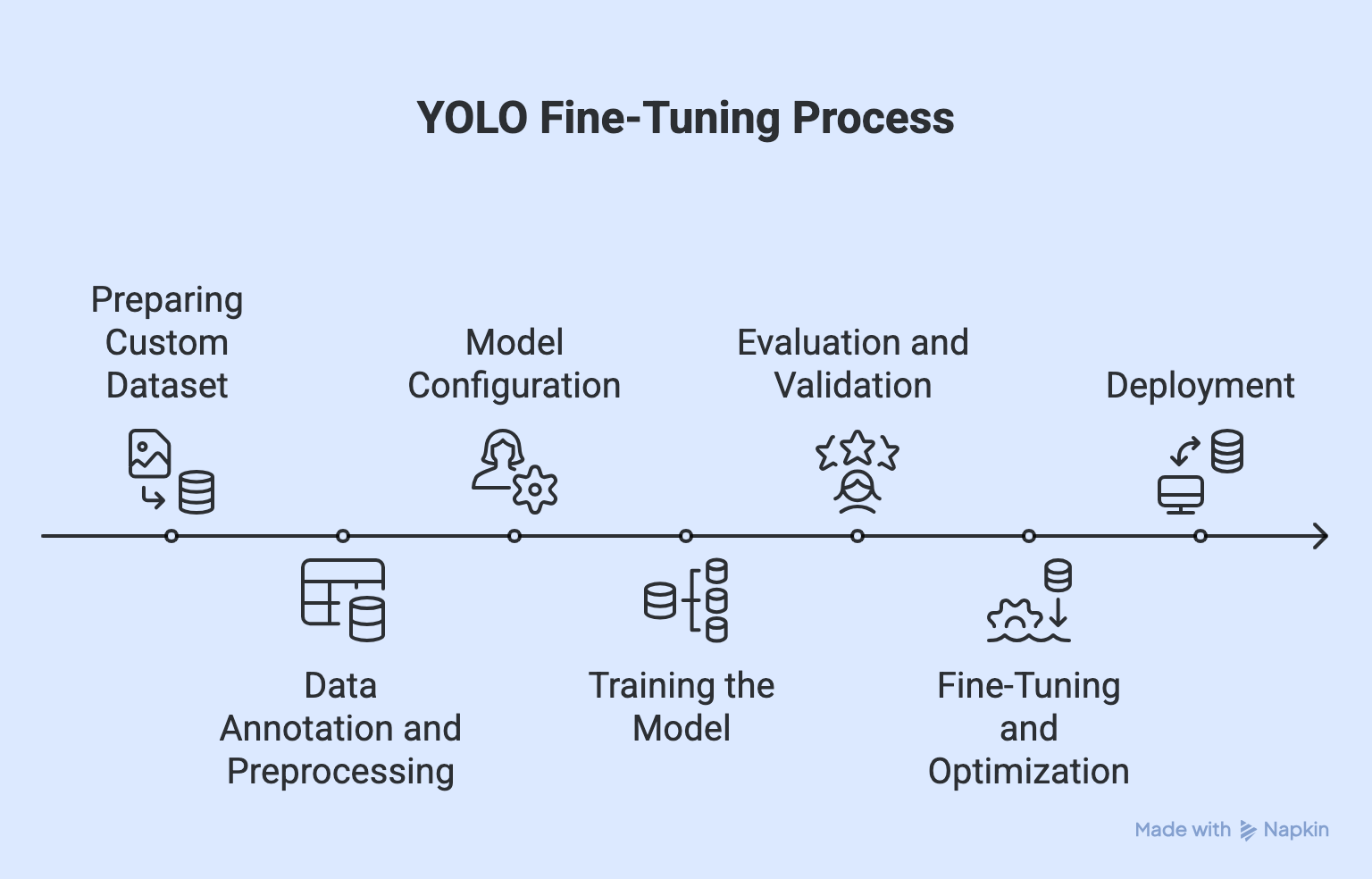
Preparing the Custom Dataset
YOLO Dataset Setup
Detection:
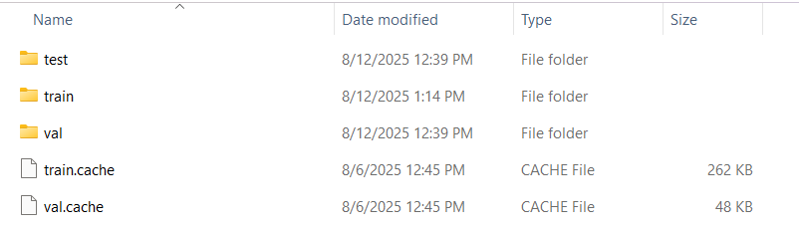
Structure:
dataset/
├─ images/{train,val,test}
└─ labels/{train,val,test}
- Each image ↔ matching .txt label.
- Splits: Train 70–80%, Val 10–20%, Test ~10%.
- Use scripts/Roboflow for balanced splits.
- data.yaml: defines train/val paths, nc, and names.
Classification:
- Organize by class:
dataset/train/{class}
dataset/val/{class}
- Labels inferred automatically, no data.yaml
Data Annotation and Preprocessing
YOLO training starts with proper data annotation:
- Draw bounding boxes, assign class IDs, and save in YOLO format:
<class_id> <x_center> <y_center> <width> <height> (all normalized 0–1, class_id starts at 0).
- Use annotation tools (not manual editing).
- Dataset structure:
dataset/
├─ images/{train,val,test}
└─ labels/{train,val,test}
Environment Setup and Dependencies
Hardware (recommended):
Environment Options:
Dependencies:
- GPU: NVIDIA ≥4 GB VRAM (8 GB+ for large models)
- RAM: 8–16 GB
- Storage: SSD
- OS: Ubuntu 18+, Windows 10/11, macOS (limited GPU)
- If no GPU → use Colab, Kaggle, or cloud GPUs (AWS/GCP/etc.).
Environment Options:
- Local: full control, needs a good GPU.
- Colab: free GPU, timeouts.
- Kaggle: free GPU/TPU, limited hours.
- Cloud GPU: scalable, paid.
Dependencies:
- Python 3.8+
- PyTorch (GPU-enabled preferred)
- OpenCV
- YOLO repo (Ultralytics v5/v8, others)
Hyperparameter Choices (Batch size, Augmentation, Image Size)
YOLOv8 Classification – Key Hyperparameters
- Batch Size: 16 → best balance; higher caused memory issues, lower slowed training.
- Data Augmentation: Crucial (augment=True); improved generalization with flips, rotations, lighting changes → boosted test accuracy.
- Image Size: 224×224 → optimal trade-off; larger slowed training, smaller lost details.
Takeaway: Careful tuning of batch size, augmentation, and image size greatly improved efficiency, stability, and accuracy for car brand classification.
Fine Tuning vs Training from scratch
YOLO Training Approaches
- Fine-Tuning (Transfer Learning)
- Start from pre-trained weights (e.g., COCO).
- Best for small/medium datasets, similar classes.
- Faster, less data, higher accuracy, less overfitting.
- May carry dataset bias, not ideal for very different domains.
Example:
yolo task=detect mode=train model=yolov8s.pt data=data.yaml epochs=50 imgsz=640
- Training from Scratch
- Initialize with random weights.
- Best for very large datasets or unique domains.
- Learns domain-specific features, no bias.
- Needs huge data, more compute, longer training (hundreds of epochs).
Note : Fine-tune for most tasks; train from scratch only with massive or highly specialized datasets
Common Issues During Training
Common YOLO Training Pitfalls & Fixes
- Overfitting → Low val mAP, high train mAP.
Augmentation, fewer epochs, smaller model, early stopping. - Underfitting → High loss, low mAP everywhere.
More epochs, larger model, better data/labels. - Class Imbalance → Some classes ignored.
Collect more data, oversample/weight rare classes. - Labeling Errors → Misaligned boxes, wrong predictions.
Check format, match IDs with data.yaml, validate in CVAT/Roboflow. - Poor Convergence → Loss flat, mAP not improving.
Adjust LR, use pre-trained weights. - Over-augmentation → Model fails on clean images.
Keep augmentations realistic, preview them. - Incorrect Image Sizes → Missed small objects, slow training.
Use consistent size (e.g., 640×640). - Hardware Limits → Crashes, OOM errors.
Lower batch size, use smaller model, enable mixed precision.
Most issues come from data quality, hyperparameters, or hardware limits — fix those first before tweaking the model.
Deployment Options
YOLO Deployment Options
- Local / On-Prem → Runs on PC/server.Offline, private, low latency | Limited hardware, harder multi-user updates
Tools: Python API, ONNX Runtime - Edge Devices → Raspberry Pi, Jetson, Movidius.
Low power, IoT-ready | Limited compute → smaller models
Tools: TensorRT, Coral TPU SDK - Cloud API → Hosted, accessed via REST API.Scalable, easy updates | Needs internet, privacy risks. Tools: AWS Lambda, GCP Run, FastAPI + Docker
- Mobile / Embedded → Runs on Android/iOS.
Offline, camera integration, fast response | Hardware limits, larger app size
Tools: TFLite (Android), CoreML (iOS) - Web Apps → Browser-based dashboard/live detection.
No install, easy integration | Needs backend for heavy inferenceTools: FastAPI/Flask backend, React/Vue frontend
Conclusion
a. What has been done
- Established YOLO as a powerful and versatile object detection framework, now capable of handling detection, classification, segmentation, and more.
- Demonstrated real-time efficiency across domains like healthcare, autonomous driving, retail, and industrial automation.
- Highlighted the critical role of dataset preparation and annotation, emphasizing quality, balance, and correct labeling.
- Shown that fine-tuning pre-trained models works best for small to medium datasets, while training from scratch suits only large, domain-specific datasets.
- Identified the impact of hyperparameters (batch size, augmentation, image size) on accuracy and stability.
- Addressed common pitfalls (overfitting, underfitting, labeling errors) and their mitigation through data quality improvements and training strategies.
- Evaluated hardware considerations, noting the efficiency gains of GPU training compared to CPUs.
- Demonstrated YOLO’s deployment flexibility across edge devices, local setups, cloud APIs, and mobile applications.
- Recognized YOLO’s strengths in speed, adaptability, and generalization when paired with strong datasets and optimized training.
b. Future Scope
- Enhance dataset strategies using synthetic data generation and active learning for broader coverage.
- Explore advanced optimization techniques (e.g., automated hyperparameter tuning, pruning, quantization) for higher accuracy and efficiency.
- Develop lightweight YOLO variants for faster deployment on constrained devices without sacrificing accuracy.
- Expand into multi-task learning by combining detection, classification, and segmentation in unified pipelines.
- Strengthen robustness against edge cases such as occlusion, low lighting, and crowded scenes.
- Leverage distributed GPU/cloud training for large-scale industrial applications.
- Integrate YOLO more deeply into real-time AI systems like autonomous vehicles, smart surveillance, and AR/VR applications.
- Contribute to continuous community-driven improvements for broader adoption and standardization in real-world AI solutions.
Reference
Getting Started
- Assessment: Evaluate AI readiness and identify use cases
- Pilot: 90-day proof of concept
- Governance: Establish AI policies and frameworks
- Scale: Enterprise-wide adoption roadmap
!